Perspectives Action button – recalculate before running TI process

If you have an action button in your TM1 Prespectives report that runs some TI and that TI uses the entered values in the given Perspectives report, the sheet needs to be recalculated in order those values to be available in the TI process. Simply go to action button properties, open Calculate tab and select “Automatically Recalculate Sheet”.

It will recalculate the report before running a TI process and solve the issue.

Run program as administrator in Windows without credentials or consent prompt

First of all this way is not recommended to implement on machines in a corporate network, but if you just want to disable that prompt on your personal home computer where you have less security requirements and understand programs you are running, this method will work for you.

Disable prompting for consent / credentials when running programs as administrator

Click Start menu, in search start typing Local Security Policy and click it once it appears. Alternatively you ca open it in Start – All Programs – (Windows) Administrative Tools – Local Security Policy.

In Local Security Policy screen, go to Security Options > User Account Control: Behavior of the Elevation Prompt for Administrators in Admin Approval Mode. Double-click it (or use a Right click and then select Properties from the menu). To disable prompting you need to select Elevate Without Prompting option. Then click Apply and close the windows for Local Security Policy.

Running programs as administrator by default

Right-click the shortcut for your program holding Shift key. Select Properties, switch to Compatibility tab and check to Run this program as administrator at the bottom.If you want that behavior for all the users on your PC, you need to click Change settings for all users and check the same option there. Click Ok to save the changes on close properties window.

All is set now

TM1 division operator (backwards slash)

In TM1 even though you can use both “” (back slash) and “/” (forward slash) for division, it’s highly recommended to use the first one – “” (back slash).
The difference:
“/” (forward slash): Division by zero using this operator returns an undefined value.
“\” (back slash): Division by zero using this operator returns zero.

Also you may get even an error like “Data Source line Error: Data Procedureline: Cell type is consolidated” when using a formula with “/” (forward slash) inside CellPutN function

TM1 – (TR3117) Unable to retrieve security objects. Please verify credentials.

You may get “(TR3117) Unable to retrieve security objects. Please verify credentials” while connecting from TM1 to for example SAP BW.
Basically TM1 uses old good Transformer to get the data/metadata. This error means the username/password are incorrect. Usually it happens when user’s password get changed. To update the password, open your TI process, go to Data Source tab, change the password, then go to the Signons button, located to the right of the User ID and Password, and update the password there. Then save the process and test again.

As per best practice, for such things we should use a system account with a non-expiring password.
But sometimes it happens when a developer was testing something with his/her own account and forgot to delete it from signons.

TM1 attribute cube rule

If you create any dimension attributes, TM1 will create “}ElementSecurity_” cube to store the attribute values. You can use it cube almost like a regular cube (there are just little restrictions).
For example you can create a rule to calculate some attributes. This approach can be used to allow users to edit element attributes in some cube and use “}ElementSecurity_” cube rule to retrieve the values.
Just keep in mind, TM1 does not support a rule on a numeric element in an attribute cube. This is done to support numeric attribute values for consolidated elements. You still can write the rules using the text representation of a valid number. Otherwise TM1 will ignore “N:” statements and you may think that TM1 attribute cube rule does not work.

TM1Web 10.2 + CAM security – Multiple URLs for different TM1 servers.

http://didenko.ca/blog/wp-content/plugins/syntax-highlighter-compress/scripts/shBrushJScript.js
In this post I will explain how to enable multiple TM1Web URLs for different TM1 servers. In my example, TM1 is configured to use CAM security (IntegratedSecurityMode=5). But you can follow similar steps for other security modes.

The result I needed to achieve was to be able to access TM1ServerName1 using the URL like tm1webhost.com/TM1ServerName1 and similarly, tm1webhost.com/TM1ServerName2 for TM1ServerName2.
Also I wanted to use the same single instance of Tomcat.

In 10.1 we could copy TM1Web folder and configure a new IIS virtual directory. In 10.2 we cannot do that. Using a single instance of Tomcat, we can have only one TM1Web URI, which is “External server URI “ in Cognos Configuration.
But we can implement multiple URIs using IIS rewrite mode and some TM1 system file tweaks. Let’s review it.
First of all, you have to install IIS URL Rewrite module. After that we can create rewrite rules. Examples:

1. Tm1Webhost/doc directory:

Pattern: doc
Ignore case, Stop processing of subsequent rules

2. TM1Webhost alias (containing “tm1web”)

Pattern: ^tm1web(.*)$
Ignore case
Action Type: Redirect
Redirect URL: http://tm1qa.cbc.ca:9510/{R:0}
Redirect Type: Temporary (307)
Append query string
Stop processing of subsequent rules

3. URLs for separate TM1 servers (assume each model starts from “tm1”)

This rule will redirect tm1webhost.com/tm1servername to tm1webhost.com:9510/tm1web?tm1servername
Pattern: ^tm1 (.*)$
Ignore case
Action Type: Redirect
Redirect URL: http://tm1qa.cbc.ca:9510/tm1web?{R:0}
Redirect Type: Temporary (307)
Append query string
Stop processing of subsequent rules

4. TM1Webhost alias (redirect everything else to TM1Web)

Pattern: (.*)
Ignore case
Action Type: Redirect
Redirect URL: http://tm1qa.cbc.ca:9510/tm1web{R:0}
Redirect Type: Temporary (307)
Append query string
Stop processing of subsequent rules

The next thing we need to modify tm1_64webappstm1webscriptstm1webstandaloneTM1WebApp.js file to check for ?tm1servername URLparameter. Find the code:

window.location.href=_a576
+"?b_action=xts.run&m=portal/bridge.xts&c_env=portal/variables_TM1.xml&c_cmd=../tm1/web/tm1web.html&ps="+_a578+"&pg="+"applications.jsp"
+"&host="+this.host
+"&server="+this.serverName;

And replace it with:

var sTM1SERVER = this.serverName;
if(location.href.indexOf("?")>0) {sTM1SERVER = location.href.substring(location.href.indexOf("?")+1,location.href.length);}
window.location.href=_a576
+"?b_action=xts.run&m=portal/bridge.xts&c_env=portal/variables_TM1.xml&c_cmd=../tm1/web/tm1web.html&ps="+_a578+"&pg="+"applications.jsp"
+"&host="+this.host
+"&server="+sTM1SERVER;

We also need to to specify “TM1ServerName” parameter in “tm1web_config.xml” in order to avoid displaying the server selection page and restart “IBM Cognos TM1 Application Server” service.
IBM Cognos Framework Manager: Show Object Dependencies and Analyze Publish Impact

You can find objects that depend on other objects, or show the dependencies of a child object. Simply right-click any object and choose Show Object Dependencies.
NOTE: if you need to find a query item dependencies you should check it for both the query item and query subject contains that query item. Because if there is a shortcut for the parent query subject, it will not show up as the query item’s dependencies.

Before publishing packages and running reports, you can see how the changes you make to a model will affect the package and the reports that use it. You can find the changes that were made to the package, and see details about each change and which reports are affected by a specific selected change.
Simply right-click the package and choose Analyze Publish Impact.

TM1 Server does not show up in clients (Architect, Perspectives, TM1Web)

Noticed in TM1 10.2.2
If trying to connect to TM1 Server from network, it does not show up in the list of available servers.
However TM1 Server is visible in a local client.

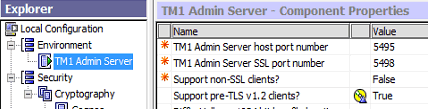
Make the next changes in IBM Cognos Configuration where TM1 Admin Server is installed:
Support pre-TLS v1.2 clients = True
TM1 support pre TLS v1.2 SSL
Restart TM1 Admin Server

Add “SupportPreTLSv12Clients=T” parameter to Tm1s.cfg file of your TM1 Server
Save Tm1s.cfg and restart TM1 server.

Now the issue should be fixed.

IBM Cognos BI Software release life cycle

RTM – Release to manufacturing
Software product is ready to be delivered or provided to the customer.

GA – General Availability
The latest date that a version/release of the product is available to all users, regardless of language or media. A product version/release is not published on the Lifecycle web site until the GA date.

EOM – End of Marketing
The effective date on which a part number ceases to be included as active and can no longer be ordered in standard price lists.

EOS – End of Support
The last date on which IBM will deliver standard support services for a given version/release of a product.

Design a site like this with WordPress.com
Get started