(TR0168) Transformer could not open the data source [Data source name]

Here I would like to mention some possible causes of (TR0168) Transformer could not open the data source error in TM1

If you use CAM authentication (Cognos BI) and see an additional error message:
QE-DEF-0368 Unable to decrypt user name and password credentials from the content store. Review and save the Cognos Configuration settings to configure your reporting environment.
Try to recreate the encryption files. Go to /configuration and delete the following folders there: csk, encryptkeypair, signkeypair. Restart Cognos service.

Other possible things:

  • Test the connection from Cognos BI
  • If TM1 uses Cognos package (and Cognos Package Connector), republish the package
  • Delete temp files in /temp and /data folders

TM1 Interview questions

What are the basic features of Cognos TM1?
• Real-time, interactive multidimensional database also with write-back functionality
• 64-bit, in memory OLAP server capable of concentrate huge volumes of data
• Enterprise level planning and analysis capabilities
• Guided modeling environment to facilitate planning, analysis and forecasting
• Rapid development of flexible models, including profitability models, without batch processing
• Integrates with IBM Cognos Business Intelligence, to establish a single view of performance

What is the main TM1 configuration file?
TM1s.cfg

What are the dynamic parameters in TM1s.cfg?
The Cognos TM1 server continuously polls the Tm1s.cfg file at 60 second intervals to determine if any dynamic parameter values have changed. If the server detects a parameter value change, the new value is applied immediately. Dynamic parameters are identified with a statement describing them as “dynamic” in this list.

What are the static parameters in TM1s.cfg?
Static parameter values are read from the Tm1s.cfg file only when the IBM Cognos TM1 server starts. If you want to change a static parameter value, you must shut down the Cognos TM1 server, edit the value in the Tm1s.cfg file, and then restart the server. Most parameters in the Tm1s.cfg file are static.

Define Persistent Feeders?
PersistentFeeders is a configuration parameter, if set to true (T), TM1 will to store the calculated feeders to a .feeders file and in this way will improve load time of cubes with feeders (while starting of TM1 service ).

How do you use TM1 cubes in Framework Manager?
TM1 cube can be added to Cognos BI package and used later in Analysis & Report studios

How to run Turbo Integrator Process from Command Line?
To initiate the TI process TM1RunTI is a command line interface tool.

Name the sub-tabs which are in advance tab of TI
The sub-tabs which are in advance tab of TI are:
• Prolog
• Metadata
• Data
• Epilog

Define Prolog tab?
Procedure is executed before the data source for the TI is opened. TI directly goes to Epilog if the data source for the process is none and if there is no data source then Metadata and data tabs are ignored.

Define Metadata?
Series of statements that update or create cubes, dimensions and other metadata structures during the processing

Define Data Tab of TI process?
Series of statements that manipulates values for each record in data source.

What is Epilog Tab of TI process?
Series of statements that is to be executed after the data source is processed.

Define Bulk Load mode?
• It enables TM1 to run in a special optimized Single-user mode. This mode has a capacity to maximize the performance for dedicated tasks during the time when there is no load on server or at night time.
• It doesn’t display a message to end-user to alert them. No new connections can be created.

What actually happens when Bulk Load mode starts?
• All the scheduled chores will be deactivated
• All the processing by other threads will be paused
• Running chores and any of the existing user threads will be suspended
• TM1 Top connections and all the system-specific threads will be suspended

How you can enable Bulk Load Mode in TI?
• In Prolog or Epilog section of TI, Bulk Load mode can be enabled.
• It always recommended that Bulk Load Mode should be enabled in Prolog section.

What are the functions required to be called for enabling or disabling the bulk load of mode?
EnableBulkLoadMode() = Enable
DisableBulkLoadMode() = Disable.

What is the limit of string length in Turbo Integrator?
The limit of string length in Turbo Integrator is 8000 single byte character. If the length will become more 8000 bytes then it gets truncated.

Name the data sources which are available with TI
Data Sources available with TI are:
• SAP via RFC
• IBM Cognos Packages
• Microsoft Analysis Services
• Relational databases using ODBC Connectivity
• Comma delimited text files including ACII files
• Other Cubes and Views

What does DELET function do?
DELET(string, start, number)
DELET returns the result of deleting a specified number of characters from a specified starting point within a string.

How many users can open or connect to one of the TM1 web application concurrently?
Using the distributed approach of TM1 10 they have done testing in thousands of users.

What is Sparse Consolidation Algorithm
• This algorithm skips over cells that contain Zero or are empty. This algorithm speeds up consolidation calculation in cubes that are highly sparse.
• When consolidating data in cubes that have rules defined, TM1 turns off this sparse consolidation algorithms because one or more empty cells may be calculated by rules.
• Skipping rules-calculated cells will cause consolidated totals to be incorrect.
• When sparse consolidation algorithm is turned off, every cell is checked for value during consolidation.

Define FEEDERS?
It creates a placeholder on the cells so that the cells will not be skipped during the consolidation.
What is the way of writing a FEEDER Statement when feeding one cube from another?
• Calculation statement always resides in the target cube, but the FEEDER statement should reside in the source cube.
• The Feeder is basically the inverse of the calculation statement in the Target Cube that requires the feeder.

What are the steps to troubleshoot the FEEDERS?
• Use Rules Tracer will be used to assist in the development and debugging of rules.
• The functionality of Rule Tracer is available in Cube Viewer

How does Rules Tracer help us?
• It traces FEEDERS; it ensures that selected leaf cells are feeding rules-calculated cells properly or not.
• It checks FEEDERS, ensures that the children of selected consolidated cells are fed properly or not. Check Feeders options is available from consolidated cells and it’s not available from leaf node.

Define the logic behind the Sparsity in cubes?
A sparse cube is a cube in which number of populated cells as a percentage of total cells is too low. On average, the more dimensions a cube has, the greater the degree of sparsity.

Define Over Feeding?
Over Feeding means defining feeders for consolidated cells. (Feeding a consolidated cell automatically feeds all children of the consolidation.)

Define Under Feeding?
Under Feeding means failing to the feed cells that contain rules-derived values. This always results in incorrect values and must be avoided at all costs.
What is the role of SKIPCHECK in TM1?
SKIPCHECK forces TM1 to use the Sparse Consolidation algorithm in all the cases.

How to implement calculations in TM1?
Calculations can be defined as a cube rule or in TI process. In the first case the calculations will be dynamic (formula value changes when formula components’ values change), but it will consume more TM1 server resources. In the second case a TI process must be triggered (manually or using a scheduled job) to recalculate and store the data.
Rules in TM1 are written to do calculations within a cube and to load data into cubes. You should write rules in the cube into which you want to load data (target cube) or want to perform calculation.

What is a dynamic subset?
This is a subset that updates automatically based on cube values (filter-based dynamic subsets) or dimension structure (expression-based dynamic subsets).

Define dimension attributes? How they can be used?
TM1 Attributes are a way of adding relevant information to elements in dimensions. The elements identify data in a cube, and the element attributes describe the elements themselves.
You can use attributes to:
• List features of elements. For example, the square footage of a store and the engine size of a car model.
• Provide alternative names, or aliases. For example, descriptive names of general ledger accounts and the local language versions of product names.
• Control the display format for the numeric data. Typically, you select a display format for the measures you track in a cube.
• You can select elements by attribute value in the Subset Editor. You can also display element names in TM1® dialog boxes using their aliases.
TM1 Perspectives

This article will be collecting useful information on TM1 Perspectives

DBRA(server:dimension, element, attribute) – returns the value of a specified element attribute
DBRA function requires that a numeric element name be enclosed in double quotes or if you use a cell reference then make sure that cell is not formatted as numeric DBRA will fail and return a blank value.

TM1 FEEDERS

This article will be collecting useful information about how TM1 FEEDERS work.

1. TM1 has a sparse consolidation algorithm which allows to skip calculations of empty/zero cells and significantly improve the performance. If you have a cube rule, by default TM1 turns off this algorithm because one or more empty cells may in fact be calculated by a rule and skipping rules-calculated cells will cause consolidated totals to be incorrect. When the sparse consolidation algorithm is turned off, every cell is checked for a value during consolidation. This can slow down calculations in cubes that are very large and sparse.
Use SKIPCHECK; in the beginning of your rule to enable sparse consolidation algorithm. You must also include a FEEDERS; declaration and that all rules-derived cells are identified by feeder statements. If you need to feed from string-type elements, you should include FEEDSTRINGS; before SKIPCHECK, so the entire rule structure will be:

FEEDSTRINGS;

SKIPCHECK;
## your rules

FEEDERS;
## your feeders

2. Use a consolidation whenever you can if you need to calculate aggregation (you can also play with elements’ weight to build some formulas). A consolidation will be fed if there is any value for one of its children.

3. Feeders work on N-level only.
Feeding from a C-level (consolidated element is on the left hand side of a feeder statement) is a shortcut for all the ultimate N element descendants of that C element.
Feeding a C-level (consolidated element is on the right hand side of a feeder statement) is a shortcut to feed all the ultimate N element descendants of that C element.
Below there is an example to understand it better.

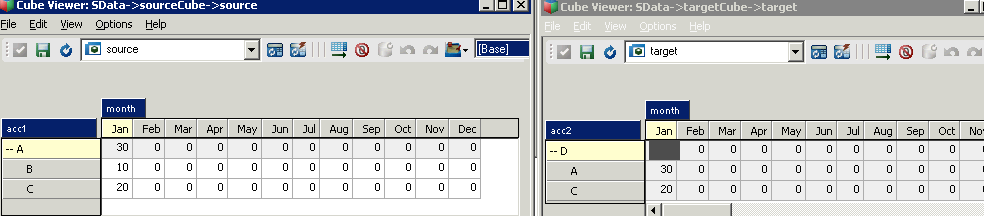
We have a source cube feeding the target:
consolidation-feeder
The target cube has the following rule:

SKIPCHECK;
[] =N: DB('sourceCube', !month, !acc2);

Now let’s look at a few possible rules for our sourceCube:

sourceCube RULE 1

SKIPCHECK;

FEEDERS;
[{'B','C'}] => DB('targetCube', !month, !acc1);

Result: As feeders work on N-level, we will have ‘C’ feeding ‘C’. ‘A’ element will not be fed in the target cube, so the target element ‘D’ will be equal to 20.


sourceCube RULE 2

SKIPCHECK;

FEEDERS;
['A'] => DB('targetCube', !month, !acc1);

Result: ‘A’ on the left hand side of the feeder statement is equal to ‘A’ element n-level descendants (‘B’ and ‘C’), as result we will have the same situation as with rule 1, so the target element ‘D’ will be equal to 20.


sourceCube RULE 3

SKIPCHECK;

FEEDERS;
['A'] => DB('targetCube', !month, 'A');

Result: ‘A’ on the left hand side of the feeder statement is equal to ‘A’ element n-level descendants, meaning elements ‘B’ and ‘C’ feeding only element ‘A’ in the target cube. Element ‘C’ will not be fed, so the target element ‘D’ will be equal to 30.

The only possible way to feed all elements in the target cube is to have some overfeeding:

sourceCube RULE 4

SKIPCHECK;

FEEDERS;
['A'] => DB('targetCube', !month, 'D');

Run VBScript from Notepad++

  1. Close Notepad++ if it’s open.
  2. Using a different text editor (i.e. regular Notepad) edit shortcuts.xml file located in:
  3. Windows XP Path:
    C:Documents and SettingsUSERApplication DataNotepad++

    Vista/Windows 7 Path:
    C:UsersUSERAppDataRoamingNotepad++

    Find <UserDefinedCommands> section and add the following line:
    <Command name="Wscript" Ctrl="yes" Alt="no" Shift="no" Key="13">c:WINDOWSsystem32wscript.exe "$(FULL_CURRENT_PATH)"</Command>

    This will assign Ctrl+Enter shortcut to execute VBScript. Save and close file.

  4. Open your VBScript file in Notepad++, try Ctrl+Enter to run it
  5. Optionally: in Notepad++ menu go to “Run > Modify shortcut/Delete Command”, there you can easily change a shortcut for the added Wscript command

TM1 Transaction log – ActiveX control (msmask32.ocx) could not be instantiated

Transaction log file displays the transactions recorded in Tm1s.log when a TM1 client changes a cube value.
To view it right-click the server and select Transaction log.

If you get “ActiveX control (msmask32.ocx) could not be instantiated. Reinstall or register control and try again” you need to make sure you have “msmask32.ocx” on your machine and it’s registered.
If it’s not found in:
– For Windows Server 2008, Windows Vista, and Windows 7:
C:WindowsSysWOW64
– For Windows XP:
C:WindowsSystem32

Then download msmask32.zip and unzip it to the folder specified above.

Then, register using the following procedure:

1. Click Start

2. Type cmd, right-click it and run as administrator

3. Type “Regsvr32.exe msmask32.ocx” and press enter. Once the file is registered successfully, try viewing the transaction log.

Cognos BI & TM1 reporting

Here I would like to list some techniques I’m using when developing IBM Cognos BI reports and using TM1 cube as datasource

1. Dimension member prompt
In the next example, I have “FIN Fiscal Period” dimension with members: Jun to Mar. I created a value prompt binded to pPeriod parameter. The prompt is populated using a query for “FIN Fiscal Period” dimension.

Now in my report query (i.e. for report crosstab) I can create a “Data Item” with the next expression:
#'[FIN FS].[FIN Fiscal Period].[FIN Fiscal Period]->:[TM].[FIN Fiscal Period].[FIN Fiscal Period].[@MEMBER].[‘+prompt(‘pPeriod’,’token’)+’]’#

Moreover, if I need to filter the entire query I can create a slicer with the same expression:
#'[FIN FS].[FIN Fiscal Period].[FIN Fiscal Period]->:[TM].[FIN Fiscal Period].[FIN Fiscal Period].[@MEMBER].[‘+prompt(‘pPeriod’,’token’)+’]’#

TO BE CONTINUED…

TM1 Drill-through (process and view)

Overview

We can drill from a cube view (or TM1Web websheet) to:
1). ODBC data source (the ODBC source must be accessible from the computer on which the TM1 server is running)
2). another cube view
3). any data source TurboIntegrator supports

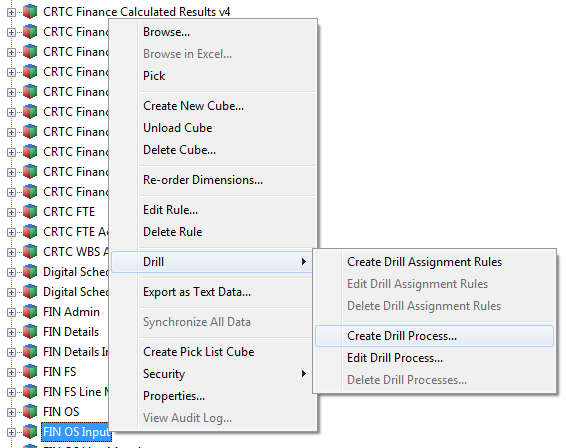
The first thing you need to do is to create a drill process. Right-click a cube and select Drill > Create Drill Process:
TM1 create drill process

For ODBC datasource you will be providing ODBC Datasource Name, User Name and Password, Datasource Query
For Cube View you will select a cube and view.

Drill process

While implementing TI process keep in mind the following:
– process parameters are the source cube dimension elements, you cannot add your custom parameters, if you want your process to work 🙂
– process parameter names might contain spaces (if dimension names contain spaces) but the spaces will be deleted when you save and re-open the process, so in your code use parameter names
– process parameter values contain the selected source cube intersection elements (the cell user is clicking and drilling from), use it to update the target view
– TM1 saves the drill process as a TurboIntegrator process, but prefixes the name you assigned in step 7 with the string }Drill_. For example, if you save a drill process with the name PriceCubeToODBCSource, TM1 saves the process as }Drill_PriceCubeToODBCSource.
– users should have a READ access to }Drill_ processes in order to be able to drill. If you have a rule for your }ProcessSecurity cube, you can add the next code:

##  allow access to }Drill processes
[ ] = S: IF( SUBST(!}Processes, 1, 6) @= '}Drill', 'READ', Continue);

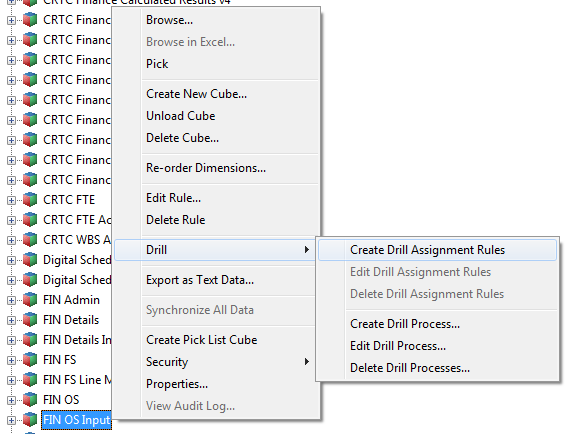
The next step is to create drill assignment rules. Right-click a cube and select Drill > Create Drill Assignment Rules:
TM1 create drill rule

Drill rule

Drill rule is a rule statement returning a drill process name. It could be something simple like:

##  use "}Drill_FIN OS Input to Details" drill process
['Amount YTD'] =S: 'FIN OS Input to Details';

Or including condition logic and multiple drill processes:

##  use empty string '' to disable drill through
['Year'] = S:IF( ( ELLEV( 'actvsbud', !actvsbud ) = 0
) & ( ELLEV( 'region', !region ) = 0 ) & ( ELLEV( 'model', !model) = 0 ) & ( ELLEV( 'account1', !account1)  = 0), 'FIN OS Input to Details', '' );

[] = S:IF( ISLEAF= 1, 'FIN OS Input to Monthly Details','');

TM1Web Export to PDF scaling fit to one page, page orientation

Here is a trick how you can make TM1Web to export your Exel websheet fitting it to one or multiple pages and setting page orientation:
1. Open your websheet in Excel

2. Go to “Page Layout” menu and set your page orientation:
TM1Web PDF Orientation
2. On the same tab go to “Page Setup” and set scaling options:
TM1Web PDF Scaling Fit To Page

3. Upload/update your websheet. Test the changes for export to PDF

IBM COGNOS TM1 SECURITY

Cube Security
Control cube: }CubeSecurity

Dimension Security
Control cube: }DimensionSecurity

Element Security
Control cube: }ElementSecurity_<%DimensionName%>
Default (blank) is NONE. User group should have at least READ access to see the element.

Cell Security
Control cube: }CellSecurity_<%CubeName%>
Cell security is used in general to override element security (only if a user group has other then NONE access for intersection elements).
Default (blank) is interpreted as default back to the underlying cube and element security.

Application Security
Control cube: }ApplicationSecurity
Default (blank) is READ access. To restrict access you need to assign NONE security for application entities that user group should not have access to. READ security allows access.

Process Security
Control cube: }ProcessSecurity
Default (blank) is NONE access. In order to be able to run the process user group should have at least READ access to that process

IMPORTANT: users permissions are not taken into account by the TI process they execute. That means if a non-admin user has NONE or READ access to some cube, he can still run a TI process which updates that cube. In other words, TI process is always run with ADMIN permissions.

You have to enable “Security Access” for processes updating security control cubes

Design a site like this with WordPress.com
Get started