Overview
We can drill from a cube view (or TM1Web websheet) to:
1). ODBC data source (the ODBC source must be accessible from the computer on which the TM1 server is running)
2). another cube view
3). any data source TurboIntegrator supports
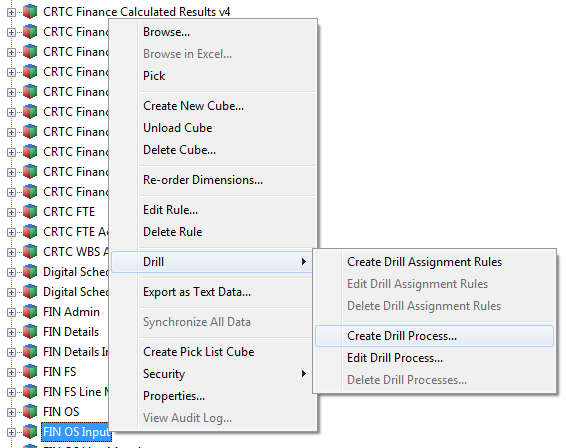
The first thing you need to do is to create a drill process. Right-click a cube and select Drill > Create Drill Process:
For ODBC datasource you will be providing ODBC Datasource Name, User Name and Password, Datasource Query
For Cube View you will select a cube and view.
Drill process
While implementing TI process keep in mind the following:
– process parameters are the source cube dimension elements, you cannot add your custom parameters, if you want your process to work 🙂
– process parameter names might contain spaces (if dimension names contain spaces) but the spaces will be deleted when you save and re-open the process, so in your code use parameter names
– process parameter values contain the selected source cube intersection elements (the cell user is clicking and drilling from), use it to update the target view
– TM1 saves the drill process as a TurboIntegrator process, but prefixes the name you assigned in step 7 with the string }Drill_. For example, if you save a drill process with the name PriceCubeToODBCSource, TM1 saves the process as }Drill_PriceCubeToODBCSource.
– users should have a READ access to }Drill_ processes in order to be able to drill. If you have a rule for your }ProcessSecurity cube, you can add the next code:
##  allow access to }Drill processes
[ ] = S: IF( SUBST(!}Processes, 1, 6) @= '}Drill', 'READ', Continue);
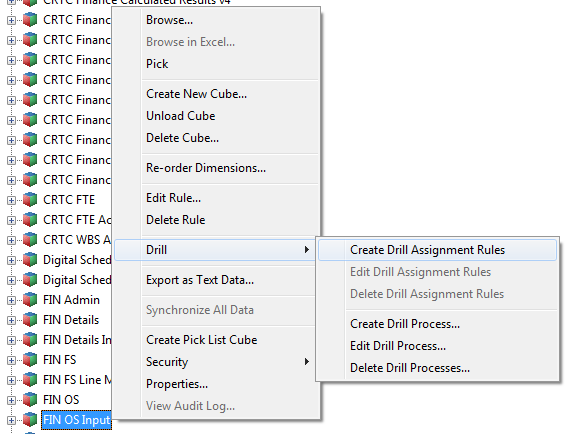
The next step is to create drill assignment rules. Right-click a cube and select Drill > Create Drill Assignment Rules:
Drill rule
Drill rule is a rule statement returning a drill process name. It could be something simple like:
##  use "}Drill_FIN OS Input to Details" drill process
['Amount YTD'] =S: 'FIN OS Input to Details';
Or including condition logic and multiple drill processes:
##  use empty string '' to disable drill through
['Year'] = S:IF( ( ELLEV( 'actvsbud', !actvsbud ) = 0
) & ( ELLEV( 'region', !region ) = 0 ) & ( ELLEV( 'model', !model) = 0 ) & ( ELLEV( 'account1', !account1)  = 0), 'FIN OS Input to Details', '' );

[] = S:IF( ISLEAF= 1, 'FIN OS Input to Monthly Details','');
 Cognos/TM1
Hi Mate,
I am trying drill through from TM1 to SQL server database. But not working for some reason. Do you have any steps for that.
Thanks
Arvin
LikeLike
You should create a drill process with ODBC connection to your SQL Server. Then create a drill rule. What steps have you tried and what is your issue?
LikeLike